Audio-only streaming
Live streaming, audio only.
Go live with sound alone. No camera, no scenes, nothing to frame. AccordMix mixes your mics and music on your computer and sends one audio feed to your listeners and to the platforms you choose.
Free to start · Works with the mic you already have
Sound first. Everything else optional.
Most broadcasts are heard more than they are watched. Audio only takes less bandwidth, needs less setup and leaves you fewer things to check while you are live.
A real mixer, not a volume slider
Up to eight named inputs on the desktop app: mics, an audio interface with several channels, and a playlist for music under your voice. Faders, meters, mute and cue on each.
Hear it before they do
Cue any source in your headphones on a separate output from the broadcast. What you check never leaks into what listeners hear.
Listeners get a player, not a video
Your station page plays your broadcast with your artwork, in any browser. People follow you, get an alert when you go live and chat while they listen.
YouTube still works
Sending an audio-only broadcast to YouTube or another video platform? AccordMix adds a plain still frame so the platform accepts the stream, and listeners there hear the same feed.
Saved on your computer
The desktop app records your mix every few seconds while you broadcast. A dropped connection never costs you the session, and you can publish the replay afterwards.
Add video when you want it
Same desk, same destinations. Add a camera, a screen or an OBS feed and the same broadcast carries video too.
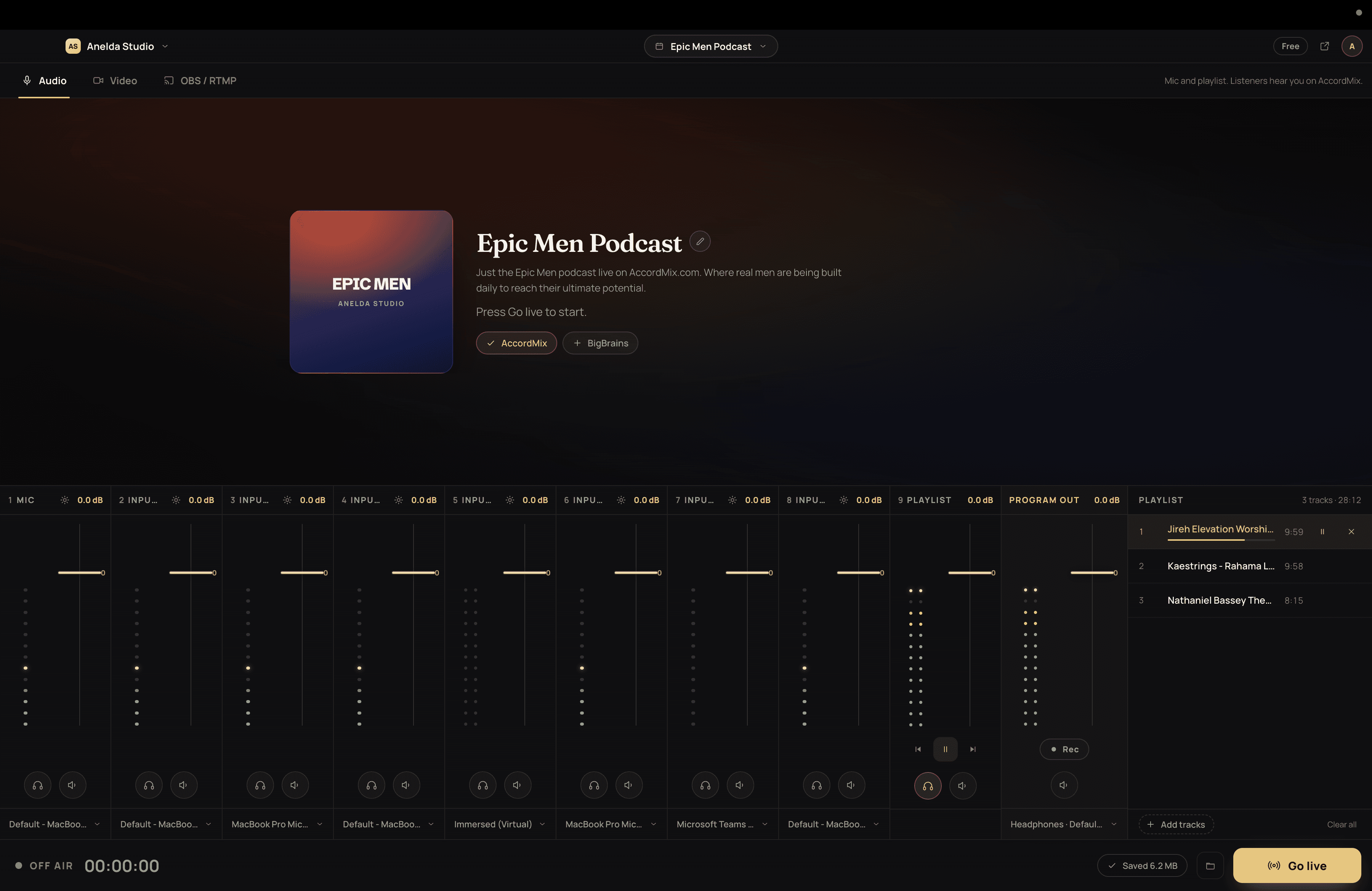
How an audio-only broadcast works
- 01
Mix on your desk
Open AccordMix on your Mac or PC, add your mics and your music bed, and cue each one in your headphones. In a hurry? Open the web studio and pick a mic, or send audio from OBS on plans that include it.
- 02
Send one feed
Name the session, choose where it goes, and go live. Your connection carries one feed no matter how many places receive it.
- 03
People listen
Followers get a notification. Your station page plays live in any browser, and the replay is kept for as long as your plan allows.
Made for people who broadcast sound.
- Churches and ministries
- Sunday services, midweek prayer, Bible study and radio-style teaching, without a camera crew. Streaming for churches.
- Podcasters and talk shows
- Go live with everyone in the room on their own mic, take the recording home, publish the replay.
- Community radio and community teams
- A station page people follow, live chat, and a mixer that behaves like a radio desk.
- Events and announcements
- Commentary and live updates where the sound is the whole story.
Need video as well? See how AccordMix relays one feed to every destination.
Audio-only streaming, answered
No. An audio-only broadcast needs a microphone or an audio interface and a free AccordMix account. Add a camera, a screen or an OBS feed later if you want video.
Your next broadcast starts on your desk.
Free to download for Mac and Windows. No credit card, no waiting on anyone to set it up for you.